How do I turn a shoebox of receipts into a clean spreadsheet?
Short answer: Give each receipt its own spreadsheet row with the date, who you paid, the amount, how you paid, a category and the business purpose, then check each month's totals against your bank and card statements. The IRS lets you use any recordkeeping system that clearly shows your income and expenses. In most cases, keep records for 3 years from when you file; some, like employment tax records, need to be kept longer. Digital copies can replace paper if your system makes accurate, complete, easy-to-read copies you can find and print, and you test it before you throw out the originals.
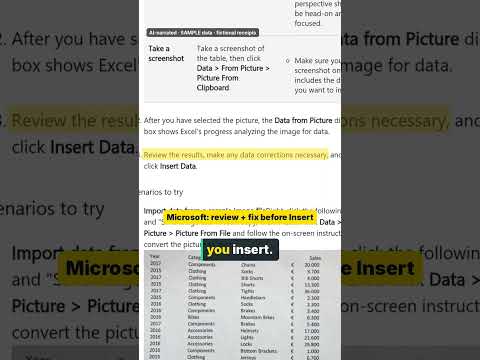 ▶ Watch the short video
- Scans and AI tools can misread numbers, like a 1 for a 7 or a dropped decimal point. Matching each month to your bank and card statements is how you catch these mistakes.
- Don't throw away paper originals until you've tested that your digital copies are complete and easy to read.
- Keep a backup of your digital records in a second place. If you can no longer open the files, IRS rules treat those records as destroyed.
- A bank or card statement proves you paid, not what you bought. Keep the receipt or invoice too.
Step by step
- Pull out the business receipts. Separate business receipts from personal ones. Also gather your bank statements, credit card statements, invoices and canceled checks for the same months. The IRS says to keep your business bank account separate from your personal account, which makes this step easier next year.
- Set up your columns. Make one row per receipt with these columns: date, vendor (who you paid), amount, payment method (cash, check, or which card or account), category, business purpose and file name. The IRS says your supporting documents should show the payee, the amount paid, proof of payment, the date and a description of what you bought.
- Scan, then let AI or an app fill the rows. Take a clear photo or scan of each receipt and name the file with the date, vendor and amount, for example 2026-03-14_hardware-store_42.18. An AI assistant or receipt app can read the date, vendor and total into your spreadsheet. Retake any photo you can't read, and keep the paper for any receipt you can't capture clearly.
- Pick a category for each row. Use the same categories as your tax form so the totals carry over. If you file Schedule C, its expense lines include advertising, car and truck expenses, contract labor, insurance, legal and professional services, office expense, rent or lease, repairs and maintenance, supplies, taxes and licenses, travel, deductible meals, utilities and other expenses.
- Match every month to your statements (the check you can't skip). For each month, add up your rows by account and compare them with that month's bank and card statements. Every charge on a statement should have a row, and every card or bank row should show up on a statement. Fix anything that doesn't match, such as a misread total, a duplicate scan or a missing receipt. The IRS says to reconcile your checking account each month and make sure the statement, your checkbook and your books agree.
- Store, back up and keep. File receipts by year and by type of expense, as the IRS suggests, and keep a backup copy in a second place. Keep them at least as long as the IRS says to keep records: generally 3 years from when you file the return they support, and longer in some cases.
What records the IRS says to keep
IRS Publication 583 says supporting documents include sales slips, paid bills, invoices, receipts, deposit slips and canceled checks. For income, keep things like cash register tapes, bank deposit slips, receipt books, invoices, credit card charge slips and Forms 1099-MISC and 1099-NEC. For expenses, keep canceled checks, account statements, credit card sales slips, invoices and petty cash slips. Keep separate records for business assets, such as what you paid and when you bought them.
If you don't have a canceled check, a bank or card statement can show proof of payment. The IRS says these statements must be highly legible and show the amount, the payee's name and the date. But proof of payment by itself doesn't prove you can take a deduction, so keep the receipt or invoice that shows what you bought.
Travel, gift and car expenses have stricter rules. IRS Publication 463 says you generally need documentary evidence, such as receipts, canceled checks or bills, for lodging and for any other of these expenses of $75 or more. A receipt is usually enough if it shows the amount, date, place and what the expense was for.
How long to keep receipts
The IRS says to keep records as long as you need them to prove the income or deductions on a tax return. In general, that's 3 years from when you filed. It's 6 years if you left out income that is more than 25% of the gross income shown on your return, and 7 years if you claim a loss from worthless securities or a bad debt deduction.
Keep employment tax records for at least 4 years after the tax is due or paid, whichever is later. If you don't file a return, or you file a fraudulent one, keep records with no end date. Keep records for property, like equipment or a vehicle, until the time limit runs out for the year you sell or get rid of it. Before you throw anything away, check whether a lender or insurance company needs you to keep it longer.
Are scanned or digital receipts OK with the IRS?
Yes, if your system meets the IRS rules. Publication 583 says all requirements that apply to paper records also apply to electronic storage systems, including ones that store images of paper records. The system must index, store, preserve, retrieve and reproduce your records in a legible format, and give the IRS a complete and accurate record of your data.
The detailed rules are in Revenue Procedure 97-22. It says stored records must have a high degree of legibility and readability, meaning a person can quickly and surely read every letter and number, both on screen and when printed. It also calls for controls that keep records from being changed or deleted without permission. And it calls for regular checks of what you've stored.
You may throw out the paper originals only after you've tested that your system copies them correctly and set up steps to keep it working. Keep the digital records as long as they may matter for taxes. If you stop keeping the hardware and software needed to open them, the IRS treats those records as destroyed. Rev. Proc. 97-22 lists backup copies, off-site storage and keeping paper copies of records that won't transfer clearly as good practices.
Common questions
Can I throw away paper receipts after I scan them?
Under IRS rules, you can destroy paper originals after you've tested that your digital system makes accurate, complete and legible copies, and you have steps in place to keep it that way. Keep paper for any receipt that's faded or won't scan clearly. If you're not sure your setup qualifies, keep the paper or ask a tax professional.
Is a bank or credit card statement enough without the receipt?
A statement can show that you paid, if it's highly legible and shows the amount, the payee and the date. But the IRS says proof of payment alone doesn't show you're entitled to a deduction, so keep the receipt or invoice that shows what you bought.
How long do I keep business receipts?
Generally 3 years from when you file the return they support. Keep them 6 years if you left out income of more than 25% of the gross income on your return, 7 years for a bad debt or worthless securities claim, and at least 4 years for employment tax records. Keep property records until the time limit ends for the year you sell or dispose of the property.
Do I need a receipt for every small purchase?
The IRS says you can use any system that clearly shows your income and expenses, backed by documents like receipts, invoices and canceled checks. For travel, gift and car expenses, Publication 463 says you generally need documentary evidence for lodging and for other expenses of $75 or more, and you still need a record of the details for smaller ones.
Can AI sort my receipts into categories?
It can speed up the typing and suggest categories, but you're still responsible for what goes on your tax return. Check each category, and match your monthly totals to your bank and card statements before you rely on the spreadsheet.
Official sources
- Publication 583 (Rev. December 2024), Starting a Business and Keeping Records — IRS (checked 2026-10-21)
- What kind of records should I keep — IRS (checked 2026-10-21)
- How long should I keep records? — IRS (checked 2026-10-21)
- Recordkeeping — IRS (checked 2026-10-21)
- Rev. Proc. 97-22 (electronic storage systems), Internal Revenue Bulletin 1997-13 — IRS (checked 2026-10-21)
- Publication 463 (2025), Travel, Gift, and Car Expenses, chapter 5 (Recordkeeping) — IRS (checked 2026-10-21)
- Schedule C (Form 1040) 2025, Profit or Loss From Business — IRS (checked 2026-10-21)
- Instructions for Schedule C (Form 1040) (2025) — IRS (checked 2026-10-21)